Posts

CGDI FC200 Clone BMW Gearbox F Series 6HP Data
Image
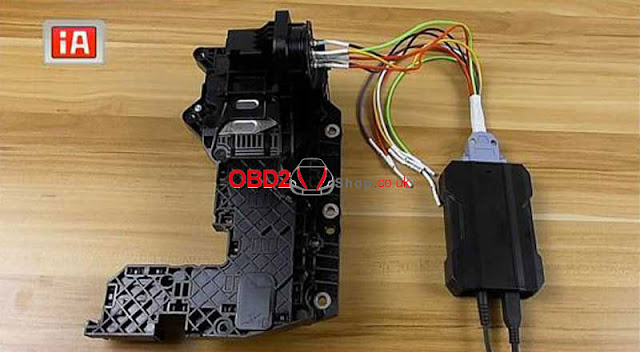
 How to use CGDI FC200 ECU Programmer to clone BMW gearbox f series 6HP data? This is a guide to show the whole procedure on cloning BMW gearbox 6HP P Flash & D Flash. Clone BMW gearbox need to do backup data & restore data. That means to acquire data from original BMW gearbox then write to a new module. CGDI FC200 supports to clone configuration files, variety of data, VIN, ISN codes, etc. The successful cloned BMW module can install to vehicle for instant communication directly. No need online programming, match or synchronize. BMW gearbox clone DOES NOT support OBD method, please disassemble gearbox before below operation. Identify Model Open CGDI FC200 software,  Select “BMW >> F Series” *If you’re not sure about its series, type in “6HP” on ECU search bar.  CG FC200 will display models in Engine-Gearbox, just look at the model in ECU. It turned out to be a CONTINENTAL 6HP TC1766 chip. Select “6HP TC1766 chip >> On bench >> Wiring diagram” ...

How to use CGDI MB to program W211 new key in used position?

Last week I made a new key for my W211 with CGDI MB . Key number 1 &2 are used, but I do not have key 2 anymore... So I did write key file 2 to a new key and tried in the car but did not succeed. The display keeps telling me "Teach-in new key please wait" for 10 minutes or so. Then I tried with key file 3 and that worked immediately. The correct steps that the senior told me: 1. read EIS, paste the known key password, disable key slot2 2. get enable password and enable key slot2 3. insert working key(3) turn to pos2 ensure it is working 4. read EIS, you will find the 'Special key' has changed. 5. paste the known key password then save EIS data file 6. (you can repeat from 1~6 two or three times) 7. use the new EIS data file to generate key files 8. write new key2 and try hope this help. If not, that mean key hash between EIS and ECU are mismatch and cannot sync, then you will need to read ECU key hash, wipe EIS, load EIS file, paste the ECU key h...

How to fix W204 dash 999999km using CGDI MB?

Image
Symptom: My workshop replaced ESL previously, and I believe my EZS has been replaced too, because the mileage in EZS is a bit weird ~ Current km reading -> over 1600k km! Last mileage, second to the last km reading -> ~70k km but it is fixed no matter how far you go. Dash mileage was ok. After CGW firmware flash in Vediamo, now dash show 99999km Tried reset ESL EZS, now EZS last mileage is 0km, but that doesn't fix dash. Tool used to virginize ezs: CGDI MB Programmer Finally, got mileage corrected. Confirm EIS need to reset couple times... Thanks to @ Speedosoft for what he shared:  I have Diagspeed too and I can tell you that the ESL is what overwrote your old value back. The CGW is sort of a passive memory and has no ability to write your old mileage back and btw it's something you can correct with Merscleaner via OBD2. You simply forgot to reset the ESL. Redo the job and take care of the ESL and your old KM value won't jump back. If that was a ...

How to solve CGDI MB erase 7G TCU I error "erase failed" ?

Image
Question: When I try to use the erase password with CGDI MB Programmer to erase 7G TCU I get error message that says erase failed. 2012 S63 AMG 722.931 Do I need to remove the TCU and do it on the bench and not in the car? Experienced user said: I saw on YouTube ECU reset process with CGDI, there was a fault to reset several times. And he just read, tries to reset, read again. And after 6-7 time fault occurred after reading ECU was renewed. So maybe you should try to do it several times. I was reading 7g at Friday, got an erase password, but I didn't try to reset. Cause I have another job to do on it. But when I come back to work I will do what I need and try to reset TCU. I just need some time to get healthy. Official how-to guide: How to use CGDI MB programmer to reset Mercedes ECU ME9.7 on Bench with success. http://blog.obd2shop.co.uk/how-to-use-cgdi-mb-to-read-erase-mb-ecu-me9-7-on-bench/ Look here: TCU 722.9 reset ok. Did 2 TCU's: VGS2 a...

Free download CG Pro 9S12 key programmer V2.1.9.0

CG Pro 9S12 key programmer can be updated to the new Version 2.1.9.0, here provides the free download link and more details. CG Pro V2.1.9.0 software download: https://mega.nz/#F!iaZWxSKK!qUCFas1gnSK2EVAOgZGN0w CG Pro V2.1.9.0 adds functions as shown below: 1. Immobilizer, added support   BMW CAS4-5M48H(Convenience) (Requires a dedicated adapter!)   BMW CAS4-5M48H(Convenience PFLASH)  (Requires a dedicated adapter!)   BMW CAS4-1N35H(Convenience)  (Requires a dedicated adapter!)   BMW CAS4-1N35H(Convenience PFLASH)  (Requires a dedicated adapter!) 2. Dashboard, added support and automatic algorithm   BMW CAS4-5M48H(Convenience)  (Requires a dedicated adapter!)   BMW CAS4-5M48H(Convenience PFLASH)  (Requires a dedicated adapter!)   BMW CAS4-1N35H(Convenience)  (Requires a dedicated adapter!)   BMW CAS4-1N35H(Convenience PFLASH)  (Requires a dedicated adapter!)   BENZ EIS-211 (ST1...

W639 AKL calculate password done by CGDI Pro MB with AC adapter

Image
Vito w639 AKL on bench done by using CGDI MB with AC adapter . This post is available with the procedure (videos, words explanation + images) Video on using CGDI BMW to collect data and calculate the password on W639. Words explanation + images: Need hardware: CGDI Prog MB programmer + AC adapter Simulate Key Need CGDI MB software Download from official site http://cgprogcar.com/ Newest version: V2.9.1.0 (09-17-2019) Here is EIS W639. Click on "Wiring diagram" in the CGDI MB software, it is as the same as W203 W463. Please follow it to connect EIS W639 to AC adapter. Read EIS data CGDI read out EIS data Calculate the password. Copy key without a key. Collect Data. On Bench. Start a keyless collection. Please unplug the direction lock ELV and connect the clip on the yellow line of the OBD line on the directional lock plug (the finest line in the directional lock connector in the K-Line) Collecting…. Please insert...

VVDI MB V5.0.1 can disable FBS4 key, CGDI MB can read FBS4 keys

Image
Confirmed: VVDI MB V5.0.1 can disable FBS4 key, CGDI MB can read FBS4 keys, and only MB dealer can do fbs4 key. VVDI MB V5.0.1 upgrade content: Add FBS4 disable key function(Special function->FBS4 disable key)- Support W166/W205/W213/W218/W222/W246 type. VVDI MB V5.0.1 free download: https://public-ap-southeast-1-1251058331.s3-ap-southeast-1.amazonaws.com/download/product/vvdi-mb/software/VVDI-MBTOOLV5.0.1_password123456.rar Pass: 12345 cgdi mb on FBS4 key: CGDI can read FBS4 keys and knows if it's in a working status or if the key is damaged; CGDI can read EIS FBS4 and knows if it is working or not working. That is CGDI can't make calculation for FBS4 . Only Read to know the status. FBS4 applicable models: Applicable Models: April 2013 to Present, Model W212; July 2013 to Present, Models 166, 207, V212; September 2014 to Present, Model 218; November 2014 to Present, Models 117, 156; April 2015 to Present, Model 172; MY-AII, Models 205, 217, 218...