Posts

Showing posts with the label cgdi fc200 ecu programmer

New CGDI BMW B48/B58 ECU Read/Write Cable for FC200

Image
Dedicated Access for Faster, More Stable ECU Work. The CGDI BMW B48/B58 Dedicated Cable is a new professional accessory for FC200 , designed for direct ECU read/write operations on BMW B48 and B58 ECUs. Its plug-and-play connection provides a fast, stable workflow while helping reduce connection-related risks and workshop time. Key Advantages 1. Dedicated to BMW B48/B58 — Designed specifically for B48 and B58 ECU read/write work. 2. Plug-and-Play Connection — Connect directly for a cleaner, more straightforward setup. 3. Fast ECU Read/Write — Streamlines data operations to save workshop time. 4. Stable Operation — Direct connection helps reduce operational and connection-related risks. New Product | Pre-Order Now The cable is currently available for pre-order, with estimated shipping in mid-October. Professional Accessory for CG FC200 | B48/B58 ECU Read/Write www.obd2shop.co.uk

Using CGDI FC200 and FC200 DAP Adapter to Read a Toyota ECU

Image
This guide demonstrates the process of reading a Toyota ECU using the CGDI FC200 tool and the FC200 DAP adapter . Connection Steps: 1. Connect the adapters in the correct sequence. 2. Refer to the wiring diagram and connect all pins accordingly. 3. Connect the device to a USB port and power supply. 4. Connect the host cable to the adapter, with the other end attached to your computer. 5. All connections are now complete. Software Operation: 1. On your computer, open the FC200 software and enter the specific ECU model. 2. Click "Connect." Once the connection is successfully established, proceed to read the Pflash memory. 3. After saving the data, the task is complete. For a visual walkthrough, please refer to the video guide: Tools available at: www.obd2shop.co.uk

CG FC200 ECU Programmer Clone Audi Gearbox DL382 Data

Image
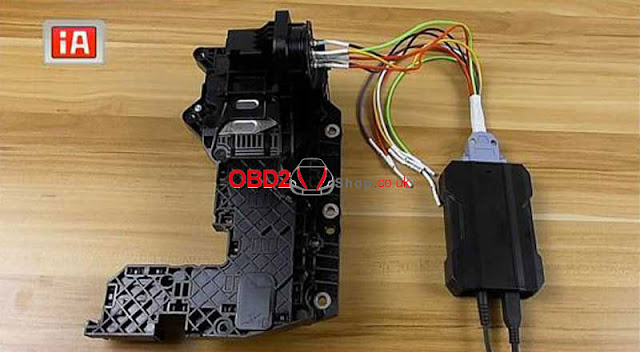
How to use CGDI FC200 ECU Programmer to clone Audi Gearbox DL382 data? Audi gearbox clone only supports to do on bench, NOT support OBD method, please disassemble gearbox module before operation. The clone procedure will need to read & write D Flash, EXT D Flash, P Flash. Read the steps below to learn how to do. Identify Start CG FC200 software,  Select car brand “Audi”. If you don’t know its model, enter “DL382” in search box.  It’ll display a model in ECU: VAG_TEMIC_DL382 TC1784, just select it. On bench >> Wiring diagram Follow the diagram to connect Audi gearbox. Click “identify”. CPU info has successfully read out, which means connection is OK. Read & Write Data Click “Read D Flash”, then save file. Click “Read EXT D Flash”, then save file. Click “Read P Flash”, then save file. P Flash reading will take for minutes, please wait and do not remove the module. After reading completed, write data separately in turn. Click “Write D Flash” to load saved file. Cl...

CGDI FC200 Clone BMW Gearbox F Series 6HP Data

Image
 How to use CGDI FC200 ECU Programmer to clone BMW gearbox f series 6HP data? This is a guide to show the whole procedure on cloning BMW gearbox 6HP P Flash & D Flash. Clone BMW gearbox need to do backup data & restore data. That means to acquire data from original BMW gearbox then write to a new module. CGDI FC200 supports to clone configuration files, variety of data, VIN, ISN codes, etc. The successful cloned BMW module can install to vehicle for instant communication directly. No need online programming, match or synchronize. BMW gearbox clone DOES NOT support OBD method, please disassemble gearbox before below operation. Identify Model Open CGDI FC200 software,  Select “BMW >> F Series” *If you’re not sure about its series, type in “6HP” on ECU search bar.  CG FC200 will display models in Engine-Gearbox, just look at the model in ECU. It turned out to be a CONTINENTAL 6HP TC1766 chip. Select “6HP TC1766 chip >> On bench >> Wiring diagram” ...