Posts

Benz Viano A639 2011 EIS Read & Write via CGPRO 9S12

Image
Benz Viano A639 2011 EIS Read & Write via CGPRO 9S12 easily and successfully. Car model: Benz Viano A639 2011 Model: A 639 900 66 00 Chip: MC9S12DT256CPVE-0L01Y Guide: Take out the EIS module from the Benz Viano. Check the model and the chip type. Open CGPRO software, check the wiring diagram. Carefully connect the wire by following the wiring diagram. CGPRO read & write EIS for Benz Viano A639 2011. It's easy to operate. Right? Credit to www.obd2shop.co.uk 
CGDI Prog BMW 4 authorizations are free (No cheat)

Image
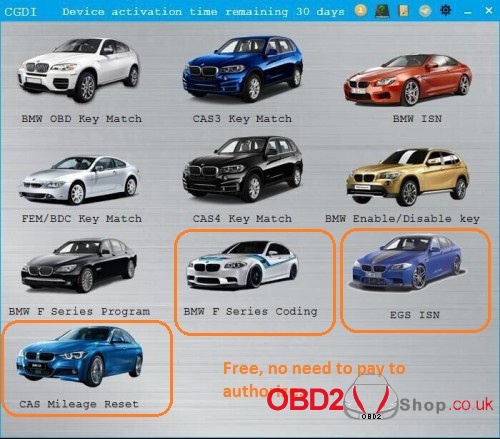
News! These CGDI PROG BMW programmer 4 authorizations are free now including BMW EGS ISN, BMW CAS Mileage Reset, BMW F Series Coding, BMW Data modification, and verification. Look here: 1. BMW EGS ISN: Free Video: How to use CGDI PROG BMW to clear and synchronize EGS ISN? 2. BMW CAS Mileage Reset: Free With this authorization, you can change mileage on BMW CAS1 CAS2 CAS3 CAS3+ CAS3++ via OBD. 3. BMW F Series Coding: Free Post: CGDI PROG BMW F series coding guide 4. BMW Data modification and verification: Free CAS3/3+ data to modify VIN and ISN CAS4/CAS4+ data to modify VIN and ISN N20 data to modify VIN and ISN No need to pay any more: When you receive CGDI BMW, just log in the official site www.cgprogcar.com to download the newest software to download, and you will find these 4 authorizations are included. http://blog.obd2shop.co.uk/cgdi-prog-bmw-4-authorizations-are-free-no-cheat/

How to use the CGDI MB Programmer to Erase the ECU

Image
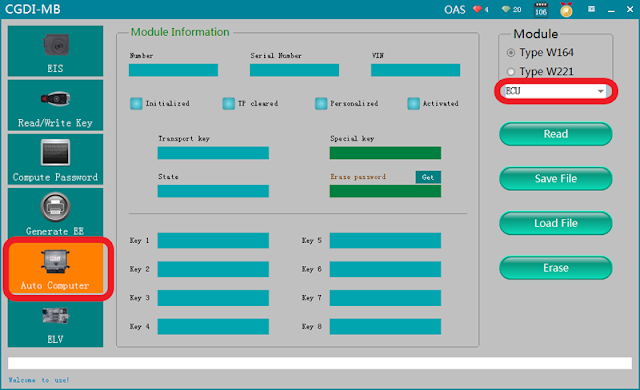
CGDI PROG Benz Key Programmer supports key matching, lock replacement, direction lock repair and support engine computer, gearbox computer, hang block computer to clear all contents through OBD operation. This post will show you erase the ECU with CGDI MB . Procedure: Remove the car, remove the ECU, and connect according to the software wiring diagram: Open CGDI MB software, enter "Auto computer", choose "Engine computer” Choose the "wiring diagram" and you can see the Software wiring diagram as shown below: Engine computer style Engine computer pin Physical wiring diagram After successful connection, click ''read'' . Then you can see the information as shown below: Click to get erase password, calculated successfully. Get the password successfully, click "Erase". Erase successfully. Click "Read" again, show it was erased. https://cgdi-prog-pro...

CGDI mb adds key on W164 old all keys lost procedure

Image
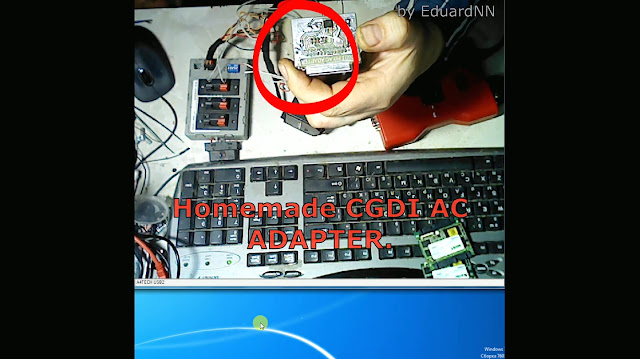
Add the key to the "Old" (A1645450908) EZS W164 with the complete loss using CGDI MB Pro. Tools and adapters to use:  1. CGDI AC adapter (to connected to CGDI MB)  This is a homemade CGDI AC adapter. This is the CGMB AC adapter made by CGDI: Src: http://www.obd2shop.co.uk/wholesale/cgdi-mb-ac-adapter-for-data-acquisition.html 2. W164 EZS "Old" (A1645450908). Prepare to add new key on the platform mode. 3. CGDI MB Procedure: Select "EIS" then "Read EIS data" as "1645450908". Select "Computer Password",  then "Copy key without key", then "Collect Data". Select "Platform mode (Quick collect)". 164 Old wiring diagram. Follow the on-screen instruction to collect data. PS: To rotate the simulation key, you need not knock hard on the EZS. EZS data collection begins... After a few (9) minutes. List created -Save it. Download the previously create...

W164 2009 +/W221 2009+ All Key lost with CGDI MB in 10 minutes

Image
In the past: CGDI MB collected data from EIS when W164 2009 +/W221 2009+ All Key lost, it cost about 2 hours.  Here a user's experience, if you had the same experience, you can skip to the next part. I did it today (EIS on the bench) w164 eis A1645451508 new type pulling dump took 80 minutes calculating pass online 4 min. key programmed !!! w164 after 2009 I did for testing 2 types of programming _ have got EZS with both programmed keys because customer claimed sometimes EIS works sometimes doesn't - I have found that connector for immo aerial was desoldered from PCB so when I fixed it - EIS became fully working again - and then I started testing CGDI and made 2 types of programming (all programming on bench - EZS + GATEWAY EMULATOR) 1) programming in case one key is available and adding spare key - ALL OK! 2) programming in case of ALL KEYS LOST - ALL OK! spare key programming was pretty fast AKL scenario takes circa 80minutes to get data from EIS and You hav...